-
Update PMS
-
- HM-2400 [UPDATE] Total Transaction Report - Change the display format for droplist Room/Table
- HM - 4767 Inhouse guest report - Filter by guest type
- HM-5505: [UPDATE] CMS - Update cancel policies
- HM-5586: [UPDATE] Menu Item Sales Report - Add Shift filter
- HM-5428 [UPDATE] Booking - Can cancel Booking that have not been CI and Balance = 0
- HM-4059[UPDATE] Report - Allow to view final bill in FnB Revenue report
- HM-4703 [UPDATE] KTV - Display the percentage (%) when the user adds a discount or surcharge to an item or order
- HM-4627 [UPDATE] FNB-Display the percentage (%) when the user adds a discount or surcharge to an item or order
- HM-4275 [UPDATE] - [FnB Report] - Combine data from the "FnB post to room" report into the "FnB revenue/ discount/ payment" report
- HM-5063 [UPDATE] FNB bill - Change line ABT & VAT tax
- HM-2300 [NEW] FNB - Allow to add Open item
- HM-4249 [HF] Add Reason when using Open discount FNB
- HM-987 [PROD] - [FnB/KTV] - Allow searching Vietnamese with diacritics
- HM-4640 [NEW] BUSINESS AREA - Allow configuring specific payment types for each Business Area
- HM-5428 [UPDATE] Booking – Can cancel Booking that have not been CI and Balance = 0
- HM-2088 [NEW] REPORT - Cancelled/ Noshow Reservation report
- HM-3551: [Update] - Create/Edit booking/Confirmation form - Add formal titles before surname/full name
- UPDATE] HM-2400 Total Transaction Report - Change the display format for droplist Room/Table
- [HM-5498] [UPDATE] OTA - Create a price configuration with tax for OTA
- Show Remaining Articles (4) Collapse Articles
-
- HM-3657 QC - [Update] - [FnB Report] - Add a filter function to get data by night audit date
- HM5301- [UPDATE] Tab Transaction > Booking Details - Allow the user to edit the Note field
- HM-3931 : [UPDATE] List reservation - Display all guest names on screen for personal booking
- HM-3126: [UPDATE] Notification - Alert when there is FnB or HK service post to room
- HM-5744: [UPDATE] FOLIO - Allow to change transaction page when booking's reservation type is Checkout/ Noshow/ Cancelled
- HM4851- [UPDATE] Room occupancy - Display number of available Special
- HM-5041 [NEW] Room status - Open popup when click on special service
- HM-4670 [UPDATE] DASHBOARD - Fix the display logic of the ‘Move Room’ field in the ‘Activity’ section of the ‘House Status’ screen
- HM-5790: Booking report - Add "Rental type" filter, "Rental type" column and report's subtitle
- HM-5813 [UPDATE] REPORT - Hide the "Search by" filter for the Breakfast report
- HM-5855 [UPDATE] DETAIL RESERVATION - Fix bug about displaying payment note after edited
- HM-3336 FnB - Add option View details at Bill list > Payment bills tab
- HM-5032: [PROD] Booking Detail - Room Detail - Optimize
- HM - 5683: [PROD] Report - Incorrect display of Booking status information.
- HM-5847 [UPDATE] Booking report - Remove the requirement to filter by From–To Date fields
- HM-5789: [UPDATE] Add column rate_change to payment_details
- HM-5700 [UPDATE] Report - FNB/KTV Menu item sales report update performance
- HM -3978 [UPDATE] Report - Breakdown Revenue for FnB reports
- HM-5636 [UPDATE] BUSINESS AREA/ RESERVATION - Automatically convert the payable amount when changing the currency type in the payment popup.
- [UPDATE] HM-5798 Room schedule - Do not allow deletion of a room if it has an OOO/OOS configuration.
- Show Remaining Articles (5) Collapse Articles
-
- HM -3978 [UPDATE] Report - Breakdown Revenue for FnB reports
- UPDATE] HM-5788 Report - Add Rental type and Rate code column to Total Transaction Report
- HM-5357 [UPDATE] Booking Service - Add function "Confirm and Print miscellaneous"
- HM-5317 [UPDATE] Night audit - Add function Export in Check rate code popup
- HM-5954 [UPDATE] Arrival report - add column Nationality
- [UPDATE] FNB/KTV/SPA - Configure to display voided items in bill/pre-check
- [UPDATE] Dashboard/ List reservation - Display room status on the “Arrival Expected” popup and the List reservation
-
- [UPDATE]-5607 Dashboard/ List reservation - Display room status on the “Arrival Expected” popup and the List reservation
- HM-5748 [UPDATE] BOOKING - Add "Walk in" checkbox on the Create/ Detail reservation/ Reservation list
- HM-4434 : [NEW] REPORT - Actual Walk-In Report
- HM-5609 [UPDATE] Cashier Transaction - Add a “Due out” checkbox to the filter section
- HM-5851 : [PRO] - Add column Transaction date in Report Move room log report
- [NEW] REPORT-H4434 - Actual Walk-In Report
- [UPDATE] Cashier Transaction - Add a “Due out” checkbox to the filter section
- [UPDATE] Create/Edit/Detail booking - Remove require of Guest Types and Payment method
- FNB - E-MENU FOR CUSTOMER
-
- HM-6083- [UPDATE] Booking Service - Not allow using the “Open Price” already been audited
- HM-2266: [NEW] REPORT - Detail Folio By Departure Date Report
- HM-6136 [UPDATE] Housekeeping - Room to clean fix sort by room number
- HM-6049: [UPDATE] CONFIGURATION - Allow configuring the rate code for specific room types
- HM-5243 [UPDATE] BOOKINGS - Add "Save and Checkin" button to the Create reservation/ Reservation detail screen
- HM-4880-02: [UPDATE]: Transfer/ Room charge to master/ Routing - update business logic - tunning code
- HM-4880-01: [UPDATE]: Transfer/ Room charge to master/ Routing - update business logic - tunning code
- HM-5468 01: E-Menu for Customer
- HM - 4267: [UDPATE] CMS - Add the "Include commission" column on the Config OTA screen
- [NEW] HM-6045 REPORT - Cancelled/ No-show reservation report
- Update “Search by” filter: Add “Cancellation date and “No-show date” option
-
- [UPDATE] FOLIO - Allow refunding deposits via a different payment method
- [UPDATE] CMS - Hide the room which have the "number of room sell on CMS" = 0 on the OTA room sale
- [Update] FnB - Add some fields in the "Update information" popup, Create the Customer Visits, Revenue & Source by Customer report, and Create the guest birthday notification feature
- Key card - Auto post service when post Lost key
- [UPDATE] Access Control - Update the text of permission "Room status update"
- [UPDATE] HOUSEKEEPING - Allow to select multiple rooms for the Room filter on the Task assignment/ Room condition/ Room to clean screen
- [NEW] REPORT - Deposit Ledger report
- [NEW] Warehouse/Report - Add a new report for inventory export management
- [UPDATE] Booking report - Add room type droplist
- [UPDATE] CRM - Customer - Allow to search by Phone number
- HM-5282: [UPDATE] Payment report - Add droplist "Payment / Paid out Type"
- HM-5610 [UPDATE] Cashier Transaction - Add a “Balance” column and the "Non-zero balance" checkbox to the Booking section
-
- FnB - Display all guests in booking when selecting room to post
- [NEW] CONFIGURATION - Add the "Feedback link" section and the feedback email flow
- [UPDATE] Booking Engine - Fix the way to display email when the hotel sends the booking confirmation
- [UPDATE] List reservation - Change position of icon OTA
- [UPDATE] Housekeeping - Allow to select "Reservation code" when posting room damage
-
- [CMS] - Revenue Manager can manage Extra Rate for BE and OTA on OTA room sale screen so that additional guest charges can be configured by date and synchronized consistently
- [CMS] Revenue Manager can set Max Stay restrictions by date for BE and OTA so that they can adjust Max Stay without leaving the OTA room sale screen
- [CMS] Revenue Manager can set Max Stay Configuration by date range in Bulk Update Restrictions
- [UPDATE] HM-3509 Create/ Detail booking/ List reservation - Add ID card and Gender field in Registration form
- [FnB/KTV] Allow users to split a finalized paid bill by item allocation
- View in-house and next booking dates on Task assignment
- [FnB/KTV] User can skip Precheck Bill printing so that the bill can proceed without printing
- [REPORT] User can filter COMP/HU reservations and view COMP/HU information on the Total transaction report so that relevant transactions are easily identified
-
- [UPDATE] Group booking – Upgrade performance for create & edit, fix bug – Check in All Booking After Release Subgroup (Group / Sub-group / Group List)
- [UPDATE] Group booking - Upgrade performance for create & edit, fix bug - View Group booking & Subgroups
- [UPDATE] Group booking - Upgrade performance for create & edit, fix bug - Search Group Booking
- [UPDATE] Group booking - Upgrade performance for create & edit, fix bug - Create Reservation Group
- [UPDATE] Group booking – Upgrade performance for create & edit, fix bug – Create Special Service
- [UPDATE] Group booking - Upgrade performance for create & edit, fix bug - Check out All Booking
-
-
Dashboard
-
Room
-
Housekeeping
-
CMS
-
Report
-
Cashier
-
Finance
-
Bussiness Area
-
- Articles coming soon
-
CRM
-
Configuration
-
- Articles coming soon
-
Log
< All Topics
Print
Room Condition
Posted
Updated
ByKim Admin
Screen hub
Menu path: Room > Housekeeping > Room condition
Use the Room condition screen to check rooms after housekeeping has cleaned them. When housekeeping staff complete their tasks, the supervisor receives a notification. The supervisor then checks each room, records the result, and either passes the room or sends the task back to housekeeping.
Before you start
- Housekeeping staff must have completed their task for the room. The supervisor gets a notification when they do.
- Only the supervisor checks the room and updates its status.
Screen overview
| Callout | Element | What it does |
|---|---|---|
| A | Room filter | Shows the rooms you pick. You can select several rooms. |
| B | Room list and room status | Shows each room and whether it is clean. |
| C | Note | Where you write a note about the check or the reason for reopening a task. |
| D | Complete check tasks button | Finishes the check. The task then goes to the Task assignment tab. |
| E | Reopen action | Sends the task back to housekeeping. |
Check a room after cleaning
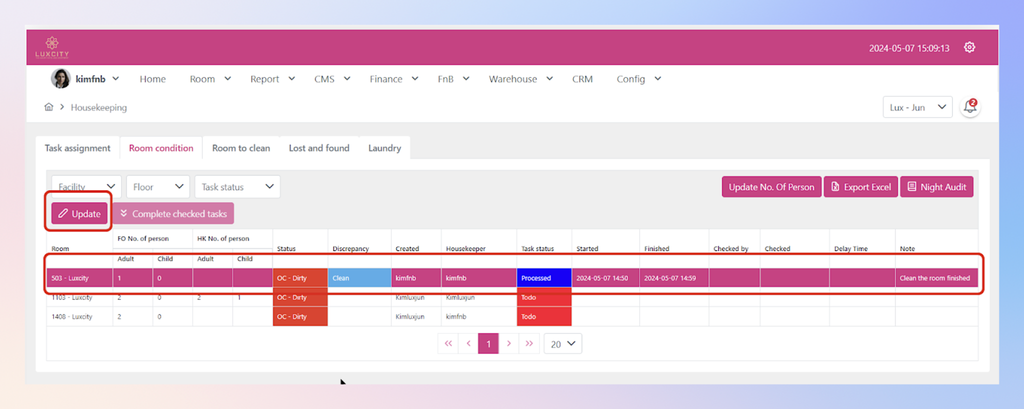
- Open the notification that housekeeping finished a task, or go to Room > Housekeeping > Room condition and pick the room in the Room filter (A).
- Check the room and update its status to show whether it is clean (B).
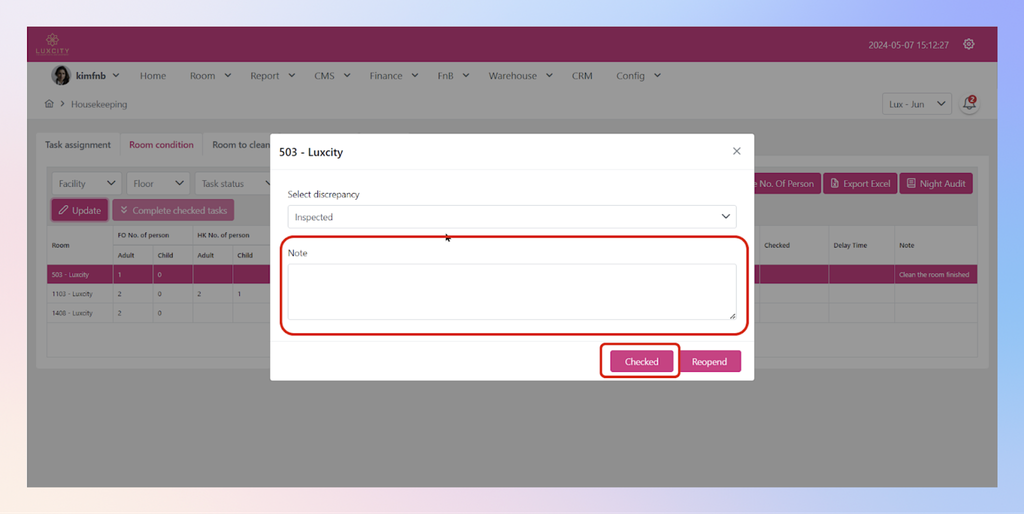
- Write a note about the check (C).
- After you have checked the discrepancy, change the status to Inspected.
- Click Complete check tasks (D).
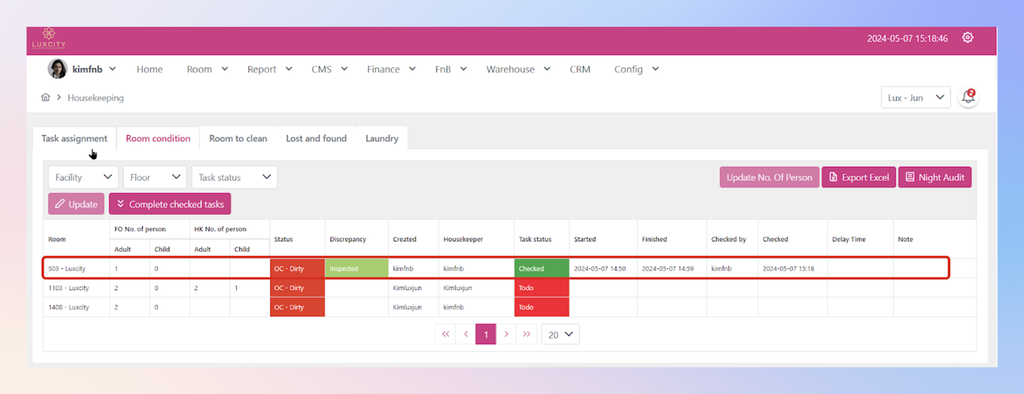
Result: The task goes to the Task assignment tab. If you do not click Complete check tasks, the task does not move there.
Supervisor updating the room status
Taking a note and changing the status to Inspected
Room marked as checked
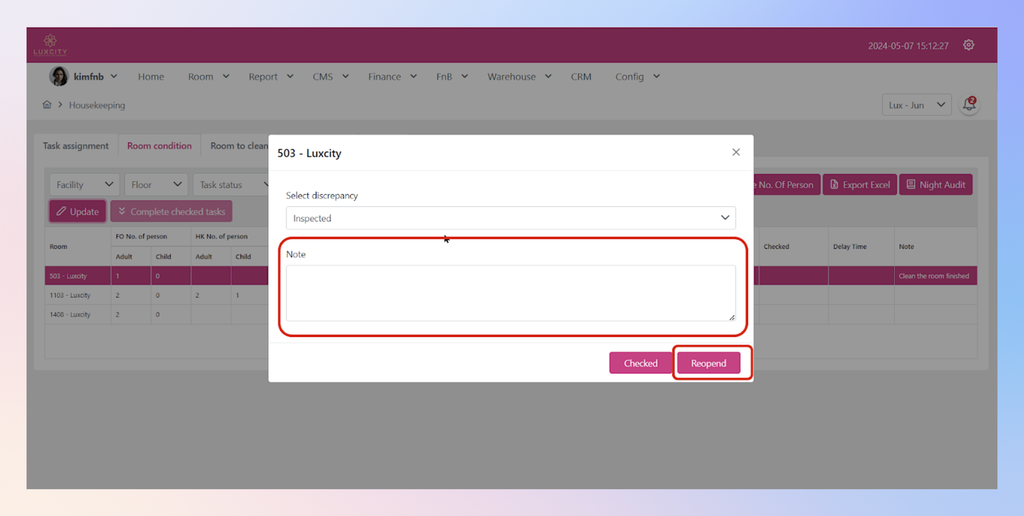
Reopen a task when the room is not clean
- Find the room in the list (A, B).
- Click the reopen action (E).
- Write the reason for reopening the task in the note (C).
- Confirm.
Result: The task is assigned to housekeeping again. Always write the reason, so housekeeping knows what to fix.
Reopening a task with a reason
Choose the outcome of the check
| Option | What it does | Value you enter | Short example |
|---|---|---|---|
| Pass the room (Inspected and Complete check tasks) | Closes the check and moves the task to Task assignment. | A note about the check | Room is clean. Note: “No issues.” Click Complete check tasks. |
| Reopen the task | Sends the task back to housekeeping. | The reason for reopening (write one every time) | Bathroom floor still wet. Reopen with the note “Bathroom floor wet, please mop again.” |