-
Update PMS
-
- HM-2400 [UPDATE] Total Transaction Report - Change the display format for droplist Room/Table
- HM - 4767 Inhouse guest report - Filter by guest type
- HM-5505: [UPDATE] CMS - Update cancel policies
- HM-5586: [UPDATE] Menu Item Sales Report - Add Shift filter
- HM-5428 [UPDATE] Booking - Can cancel Booking that have not been CI and Balance = 0
- HM-4059[UPDATE] Report - Allow to view final bill in FnB Revenue report
- HM-4703 [UPDATE] KTV - Display the percentage (%) when the user adds a discount or surcharge to an item or order
- HM-4627 [UPDATE] FNB-Display the percentage (%) when the user adds a discount or surcharge to an item or order
- HM-4275 [UPDATE] - [FnB Report] - Combine data from the "FnB post to room" report into the "FnB revenue/ discount/ payment" report
- HM-5063 [UPDATE] FNB bill - Change line ABT & VAT tax
- HM-2300 [NEW] FNB - Allow to add Open item
- HM-4249 [HF] Add Reason when using Open discount FNB
- HM-987 [PROD] - [FnB/KTV] - Allow searching Vietnamese with diacritics
- HM-4640 [NEW] BUSINESS AREA - Allow configuring specific payment types for each Business Area
- HM-5428 [UPDATE] Booking - Can cancel Booking that have not been CI and Balance = 0
- HM-2088 [NEW] REPORT - Cancelled/ Noshow Reservation report
- HM-3551: [Update] - Create/Edit booking/Confirmation form - Add formal titles before surname/full name
- UPDATE] HM-2400 Total Transaction Report - Change the display format for droplist Room/Table
- [HM-5498] [UPDATE] OTA - Create a price configuration with tax for OTA
- Show Remaining Articles (4) Collapse Articles
-
- HM-3657 QC - [Update] - [FnB Report] - Add a filter function to get data by night audit date
- HM5301- [UPDATE] Tab Transaction > Booking Details - Allow the user to edit the Note field
- HM-3931 : [UPDATE] List reservation - Display all guest names on screen for personal booking
- HM-3126: [UPDATE] Notification - Alert when there is FnB or HK service post to room
- HM-5744: [UPDATE] FOLIO - Allow to change transaction page when booking's reservation type is Checkout/ Noshow/ Cancelled
- HM4851- [UPDATE] Room occupancy - Display number of available Special
- HM-5041 [NEW] Room status - Open popup when click on special service
- HM-4670 [UPDATE] DASHBOARD - Fix the display logic of the ‘Move Room’ field in the ‘Activity’ section of the ‘House Status’ screen
- HM-5790: Booking report - Add "Rental type" filter, "Rental type" column and report's subtitle
- HM-5813 [UPDATE] REPORT - Hide the "Search by" filter for the Breakfast report
- HM-5855 [UPDATE] DETAIL RESERVATION - Fix bug about displaying payment note after edited
- HM-3336 FnB - Add option View details at Bill list > Payment bills tab
- HM-5032: [PROD] Booking Detail - Room Detail - Optimize
- HM - 5683: [PROD] Report - Incorrect display of Booking status information.
- HM-5847 [UPDATE] Booking report - Remove the requirement to filter by From–To Date fields
- HM-5789: [UPDATE] Add column rate_change to payment_details
- HM-5700 [UPDATE] Report - FNB/KTV Menu item sales report update performance
- HM -3978 [UPDATE] Report - Breakdown Revenue for FnB reports
- HM-5636 [UPDATE] BUSINESS AREA/ RESERVATION - Automatically convert the payable amount when changing the currency type in the payment popup.
- [UPDATE] HM-5798 Room schedule - Do not allow deletion of a room if it has an OOO/OOS configuration.
- Show Remaining Articles (5) Collapse Articles
-
- HM -3978 [UPDATE] Report - Breakdown Revenue for FnB reports
- UPDATE] HM-5788 Report - Add Rental type and Rate code column to Total Transaction Report
- HM-5357 [UPDATE] Booking Service - Add function "Confirm and Print miscellaneous"
- HM-5317 [UPDATE] Night audit - Add function Export in Check rate code popup
- HM-5954 [UPDATE] Arrival report - add column Nationality
- [UPDATE] FNB/KTV/SPA - Configure to display voided items in bill/pre-check
- [UPDATE] Dashboard/ List reservation - Display room status on the “Arrival Expected” popup and the List reservation
-
- [UPDATE]-5607 Dashboard/ List reservation - Display room status on the “Arrival Expected” popup and the List reservation
- HM-5748 [UPDATE] BOOKING - Add "Walk in" checkbox on the Create/ Detail reservation/ Reservation list
- HM-4434 : [NEW] REPORT - Actual Walk-In Report
- HM-5609 [UPDATE] Cashier Transaction - Add a “Due out” checkbox to the filter section
- HM-5851 : [PRO] - Add column Transaction date in Report Move room log report
- [NEW] REPORT-H4434 - Actual Walk-In Report
- [UPDATE] BOOKING - Add "Walk in" checkbox on the Create/ Detail reservation/ Reservation list
- [UPDATE] Cashier Transaction - Add a “Due out” checkbox to the filter section
- [UPDATE] Create/Edit/Detail booking - Remove require of Guest Types and Payment method
- FNB - E-MENU FOR CUSTOMER
-
- HM-6083- [UPDATE] Booking Service - Not allow using the “Open Price” already been audited
- HM-2266: [NEW] REPORT - Detail Folio By Departure Date Report
- HM-6136 [UPDATE] Housekeeping - Room to clean fix sort by room number
- HM-6049: [UPDATE] CONFIGURATION - Allow configuring the rate code for specific room types
- HM-5243 [UPDATE] BOOKINGS - Add "Save and Checkin" button to the Create reservation/ Reservation detail screen
- HM-4880-02: [UPDATE]: Transfer/ Room charge to master/ Routing - update business logic - tunning code
- HM-4880-01: [UPDATE]: Transfer/ Room charge to master/ Routing - update business logic - tunning code
- HM-5468 01: E-Menu for Customer
- HM - 4267: [UDPATE] CMS - Add the "Include commission" column on the Config OTA screen
- [NEW] HM-6045 REPORT - Cancelled/ No-show reservation report
- Update “Search by” filter: Add “Cancellation date and “No-show date” option
-
- [UPDATE] FOLIO - Allow refunding deposits via a different payment method
- [UPDATE] CMS - Hide the room which have the "number of room sell on CMS" = 0 on the OTA room sale
- [Update] FnB - Add some fields in the "Update information" popup, Create the Customer Visits, Revenue & Source by Customer report, and Create the guest birthday notification feature
- Key card - Auto post service when post Lost key
- [UPDATE] Access Control - Update the text of permission "Room status update"
- [UPDATE] HOUSEKEEPING - Allow to select multiple rooms for the Room filter on the Task assignment/ Room condition/ Room to clean screen
- [NEW] REPORT - Deposit Ledger report
- [NEW] Warehouse/Report - Add a new report for inventory export management
- [UPDATE] Booking report - Add room type droplist
- [UPDATE] CRM - Customer - Allow to search by Phone number
- HM-5282: [UPDATE] Payment report - Add droplist "Payment / Paid out Type"
- HM-5610 [UPDATE] Cashier Transaction - Add a “Balance” column and the "Non-zero balance" checkbox to the Booking section
-
- FnB - Display all guests in booking when selecting room to post
- [NEW] CONFIGURATION - Add the "Feedback link" section and the feedback email flow
- [UPDATE] Booking Engine - Fix the way to display email when the hotel sends the booking confirmation
- [UPDATE] List reservation - Change position of icon OTA
- [UPDATE] Housekeeping - Allow to select "Reservation code" when posting room damage
-
- [CMS] - Revenue Manager can manage Extra Rate for BE and OTA on OTA room sale screen so that additional guest charges can be configured by date and synchronized consistently
- [CMS] Revenue Manager can set Max Stay restrictions by date for BE and OTA so that they can adjust Max Stay without leaving the OTA room sale screen
-
-
Dashboard
-
Room
-
Housekeeping
-
CMS
-
Report
-
Cashier
-
Finance
-
Bussiness Area
-
- Articles coming soon
-
CRM
-
Configuration
-
- Articles coming soon
-
Log
< All Topics
Print
[CMS] Revenue Manager can set Max Stay restrictions by date for BE and OTA so that they can adjust Max Stay without leaving the OTA room sale screen
Posted
Updated
ByKim Admin
- Update: The OTA Room Sale screen doesn’t support editing Maximum stay per day today. This story adds an optional “Maximum stay” row (via “View more”) with two edit methods, and ensures the new value is enforced immediately in the search/booking flow.
- Navigation: CMS > OTA Room sale
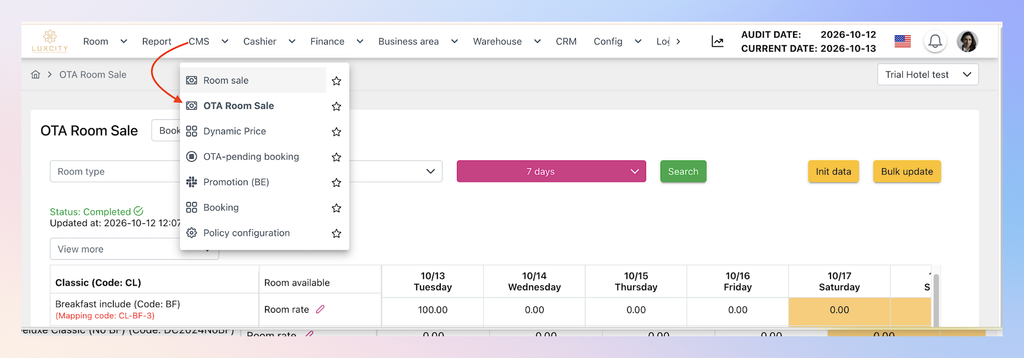
- Edit Maximum stay
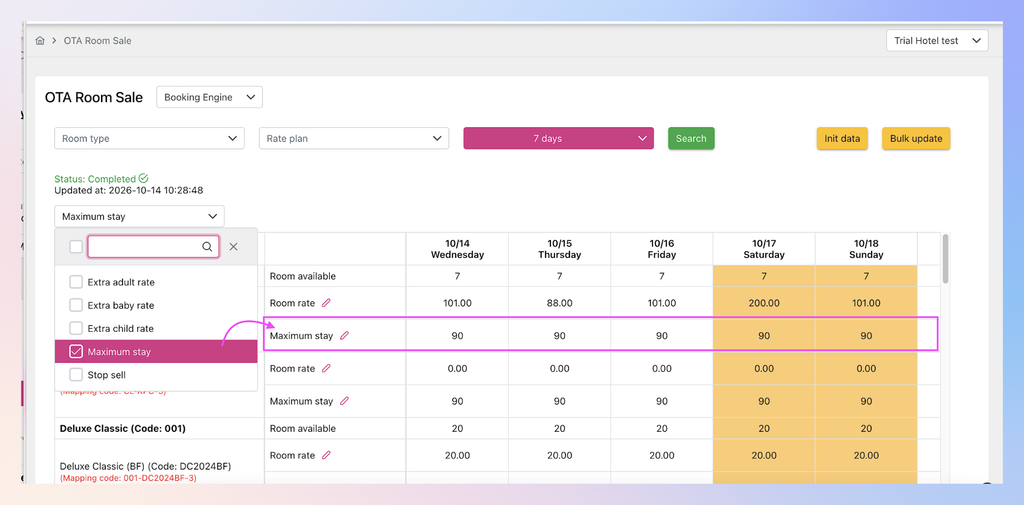
- Check the checkbox of maximum stay in View more droplist to show line of Max stay
- Default max stay per day is 90
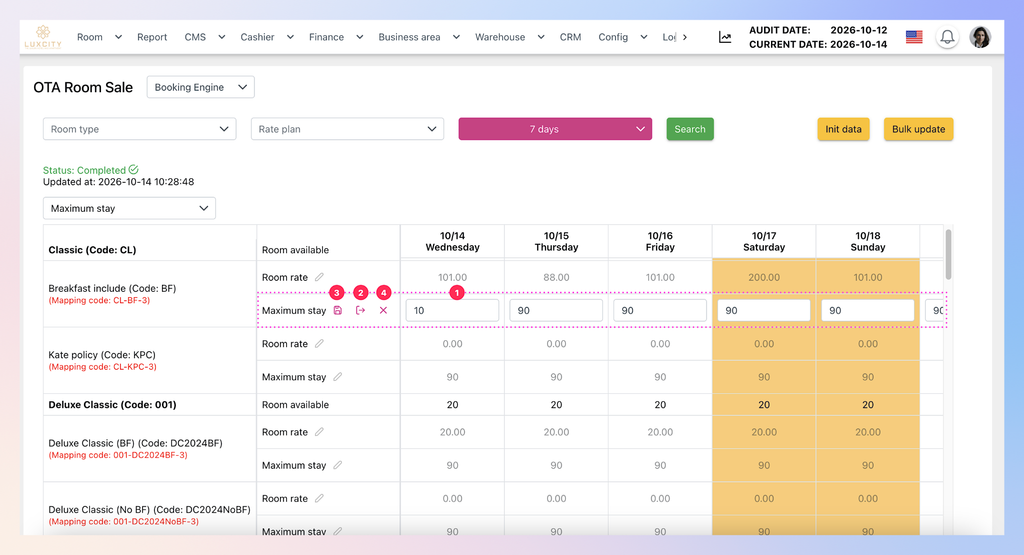
- Edit/Save/Cancel buttons are aligned in position
- Click the pencil to edit maximum stay following these steps:
- Adjust rate per day (1)
- Click (2) to synchronize price for whole filtered day range
- Click (3) to save the adjustment
- Click (4) to cancel the change
- The validation of max stay from 1 to 90.
- Edit rate for a single day
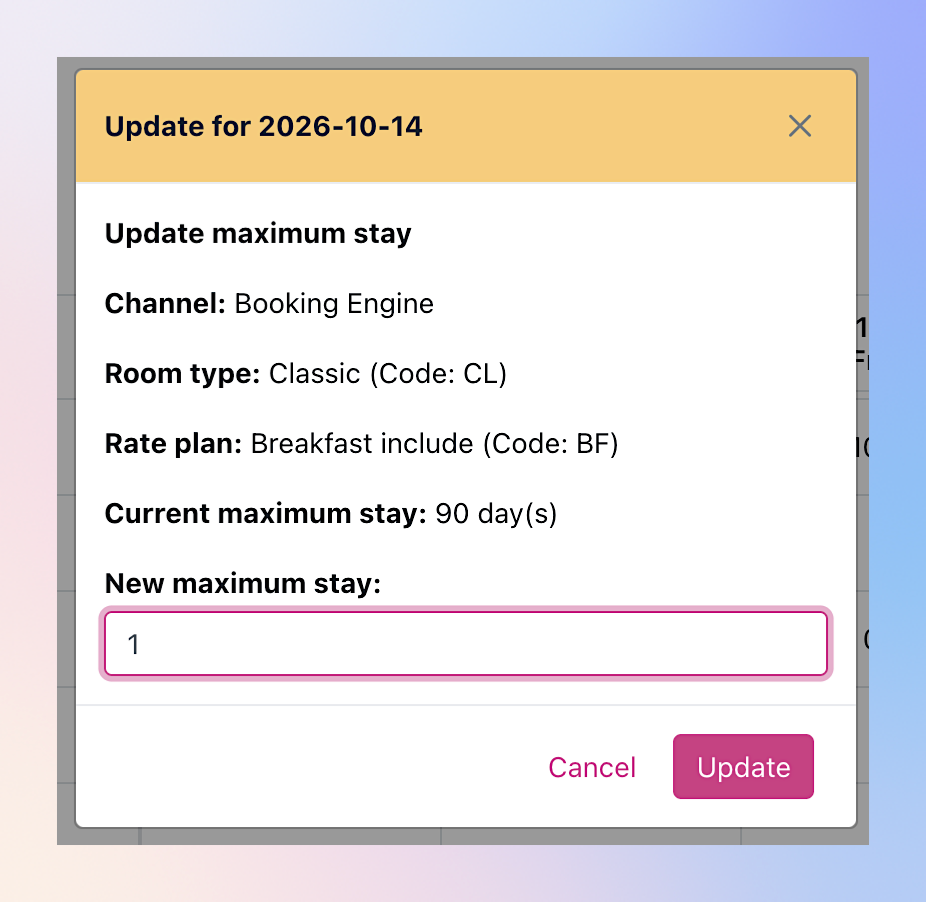
- Click number of Max stay on specific day to show Edit pop up
- Input the new value – valid from 1 to 90.
- Click Update to change
- Click number of Max stay on specific day to show Edit pop up
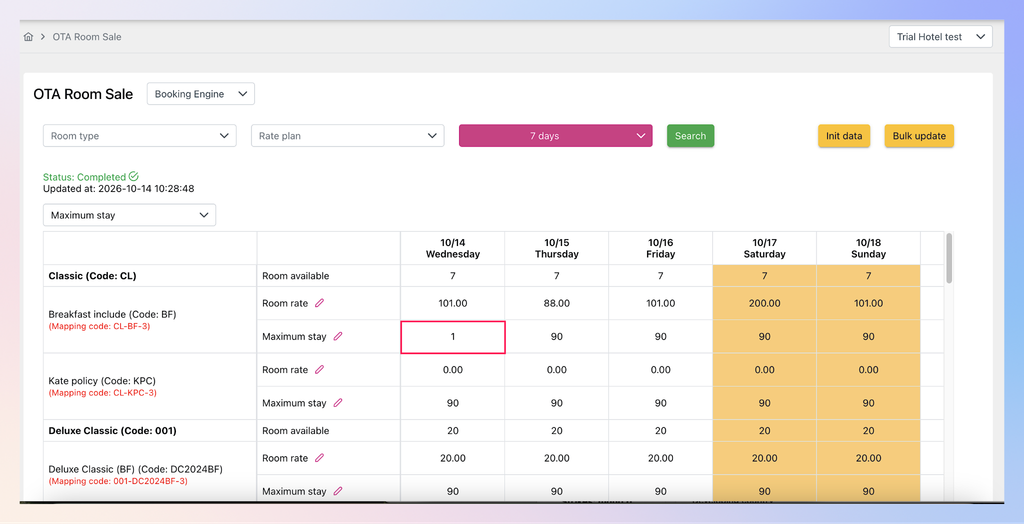
- After saving, the price is updated:
4. Reservation on BE
- Search flow checks LOS (length of stay) against Maximum stay right after saving → Check the total of LOS against the Minimum of Maximum stay of each day within the LOS
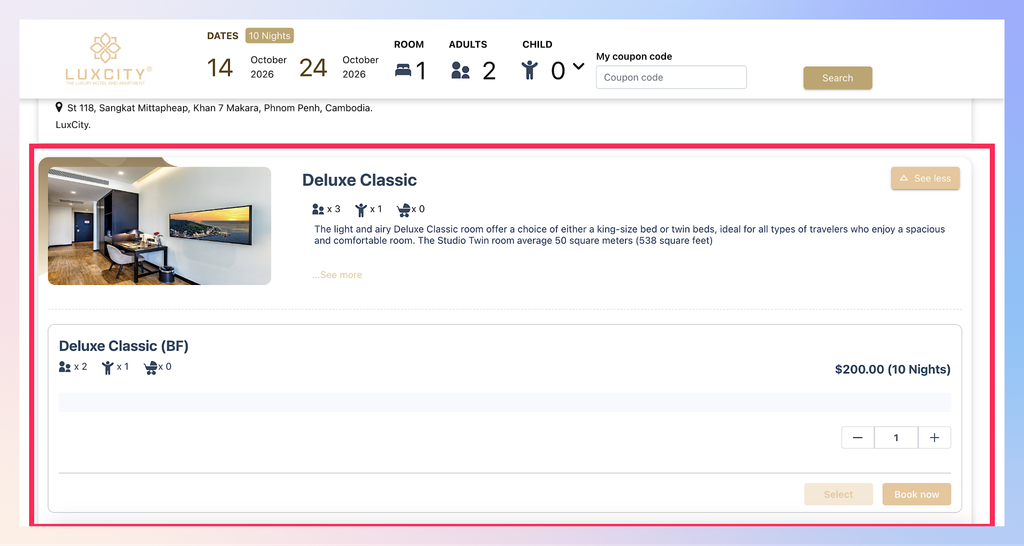
- If LOS (length of stay) of reservation < or = the Minimum of Maximum stay of each day within the LOS → Display mapping code that meets the conditions.
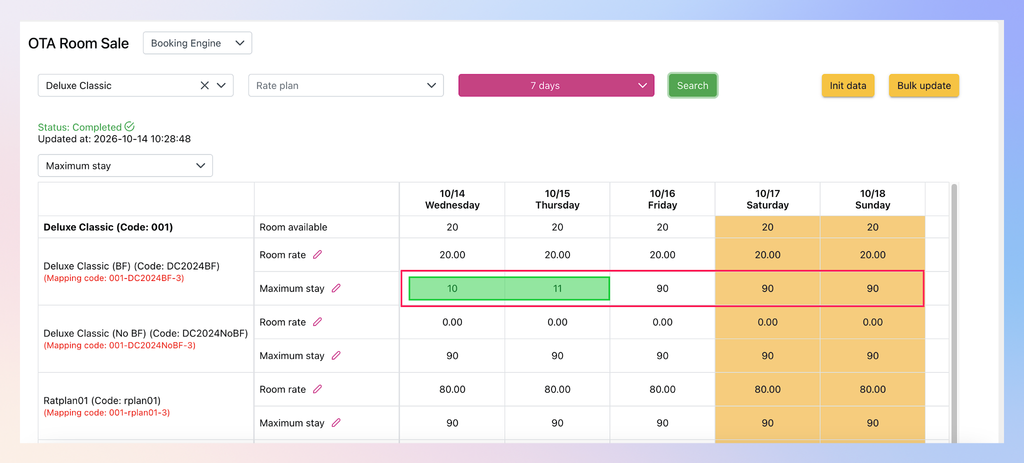
- For example, LOS (length of stay) of reservation is 10 and the Minimum of Maximum stay of a day within the LOS is 10 (or 11) → Display mapping code that meets the conditions.
- If LOS (length of stay) of reservation > the Minimum of Maximum stay of each day within the LOS → NO Displaying any mapping code.
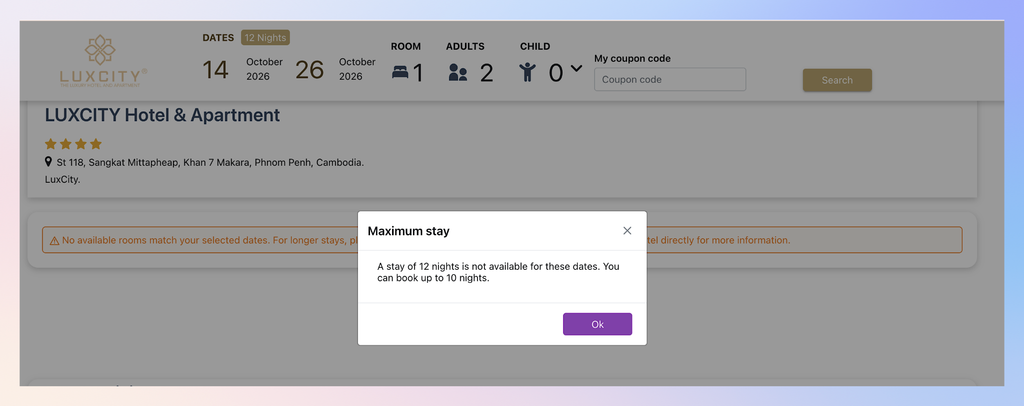
- For example, LOS (length of stay) of reservation is 12 and the Minimum of Maximum stay of a day within the LOS is 10 (or 11) → NO Displaying any mapping code and message pop up “A stay of 12 nights is not available for these dates. You can book up to 10 nights” and warning “No available rooms match your selected dates. For longer stays, please check our long-stay policy on our website or contact the hotel directly for more information.