Actual Walk-In Report
The “Actual Walk-in report” allows users to track, analyze and export detailed reports on all Walk-in bookings in the hotel.
This report assists FO , hotel management and sales department in :
- Evaluate the performance of Walkin booking channel and make business decisions
- Easily track and analyze the number of Walk-in bookings over a specific period of time.
1. Add access to the report screen Report > FO report > Actual Walk-in report
In the Config > Access control screen, add the checkbox option “Actual walk-in report” to:
- Popup “New role” when user clicks “New” button
- Popup “Edit role” when user clicks “Edit” button
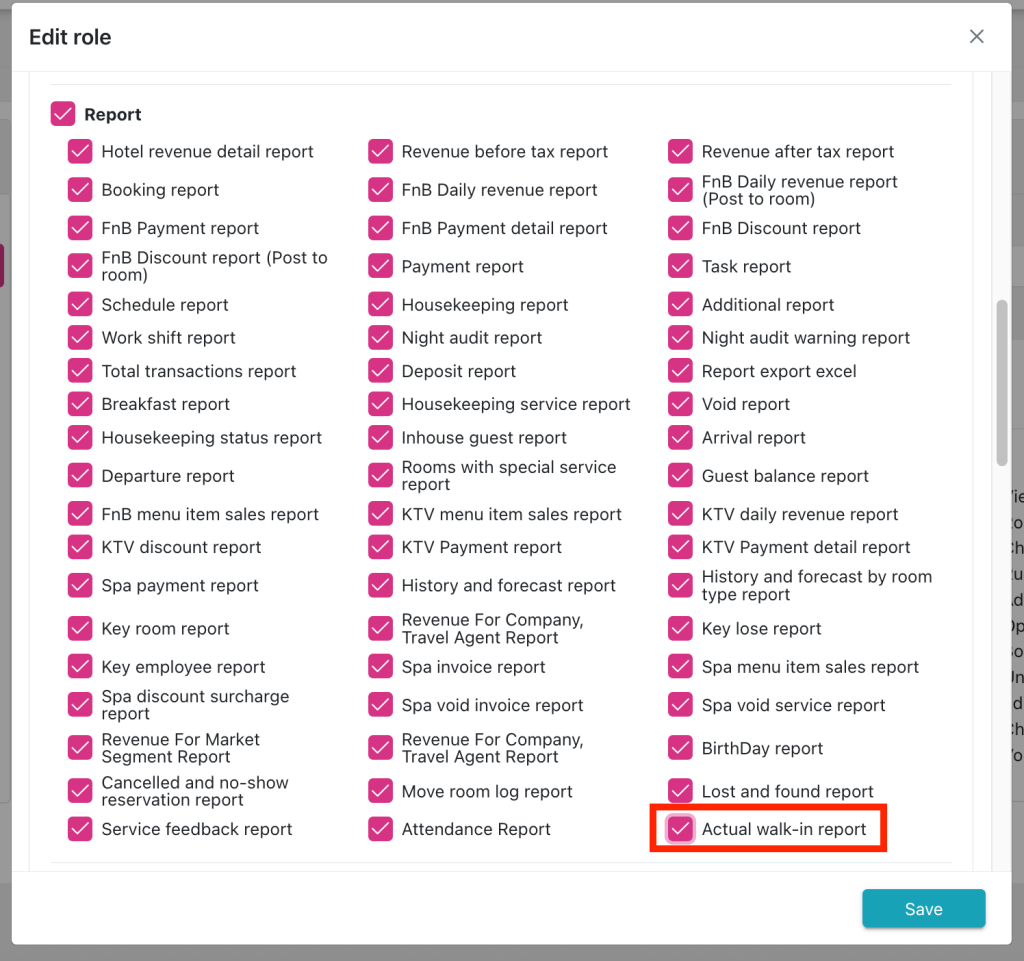
2. Add the “Actual walk-in report” option to the Report > FO report group
On the Report screen, add the option “Actual walk-in report” to the report droplist when the user clicks on the report group “ FO report”.
When the user clicks on the “Actual walk-in report” option, the report template will be displayed on the right side of the report menu bar.
Navigation: Report (1) > FO report (2) > Actual Walk-in report (3)
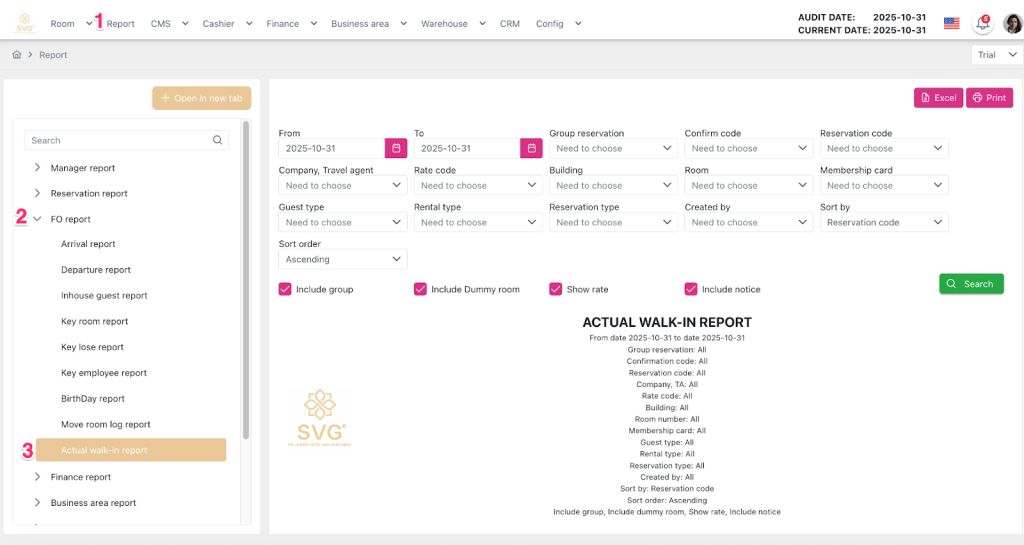
3. Create the Actual Walk-in Report screen .
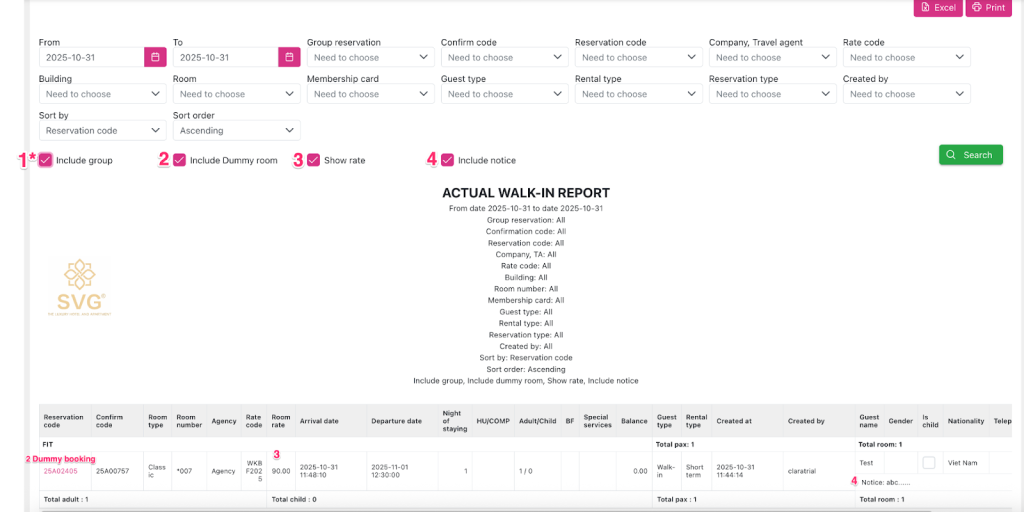
3.1. There are 4 views to view the report based on the status of the checkboxes
- View 1 (Default): Displayed when a new user accesses the report UI for the first time (checkbox states Include Group (1*), Include Dummy room (2), Show rate (3), Include Notice (4) = ON)
- “Include Group (1*): currently the child booking, walk in checkbox is disabled, therefore, “Include group checkbox” in report is not impossible.
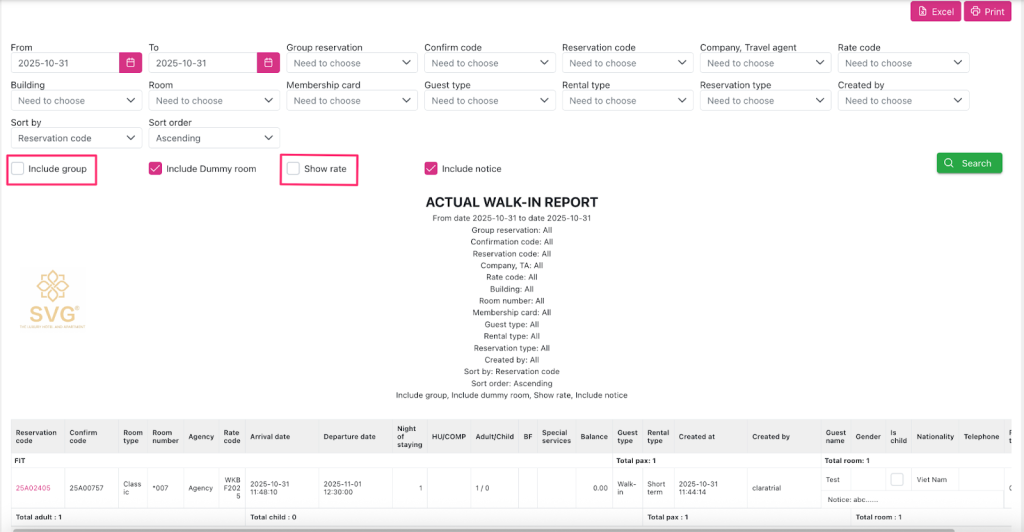
- View 2 and View 3: Display when state checkbox:
- “Include Group” = OFF (or when there is no group booking walk in in the date range)
- “Show rate” = OFF
- View 4: Display when only state checkbox “Include Notice” = OFF
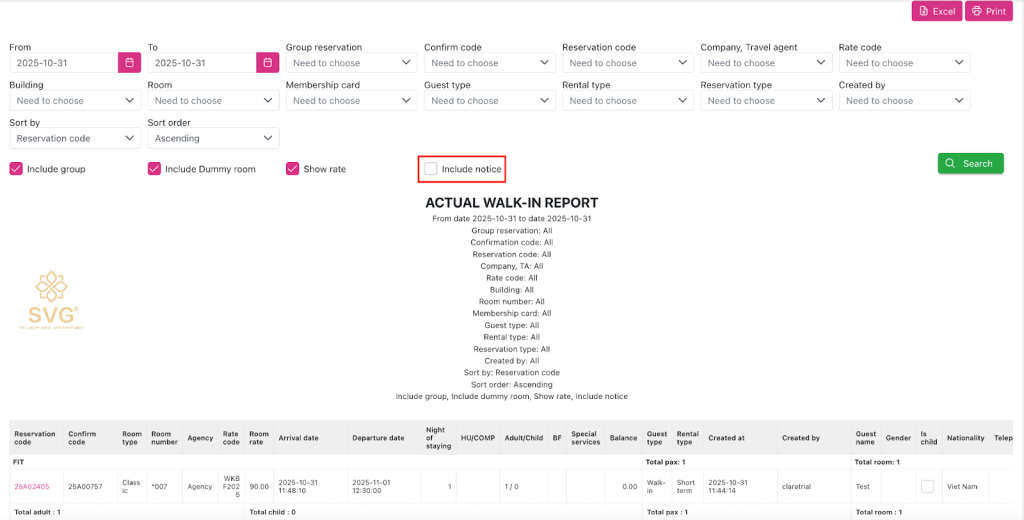
From: Start date of the search period
To: End date of the search period
Group reservation: The booking code of the group booking of the child booking has Walk in the grid
Confirm code: The confirmation code of booking has Walk in status in grid
Reservation code: Booking code that generates rebate transactions on the grid
Company, Travel agent: Travel Company/ Agent
Rate code: Room rate package
Building: Building
Room number: Room number
Membership card: Membership card level
Guest type: Rental guest type
Rental type
Reservation type: Booking status type
Created by: User created the booking
Sort by: Priority Criteria, including: Reservation code
Room number
Sort order: including:
Ascending
Descending
Include Group: Display options include bookings belonging to booking groups
Include Dummy room: Dummy room booking option
Show rate: Option to display “ Room rate” field
Include Notice: Option to display “Notice” field
Excel: export Excel report
Print: Print report
Search: Retrieve data on filter conditions
Report detail:
Actual Walk in Report: report name
FIT: Individual guest bookings.
GIT: Group bookings
Reservation code hyperlink: The booking code of the walk in booking has a check in date in the From – To date range
Clicking will open a new tab and navigate the Booking Detail.
Confirm Code
Room type
Room number
Company, TA
Rate code
Room rate
Arrival date
Departure Date
Night of staying: Number of nights the corresponding booking
HU/COMP: The internal free booking option status of the corresponding booking
No of Adult/ No of Child: Number of adult/children of the corresponding booking
BF: Break option ỏ not of the corresponding booking
SpecialService: Special service of the corresponding booking
Balance: Current balance if the corresponding booking
Guest type: The guest class of the booking correspond to Reservation code
Rental type: Room rental form of the corresponding booking
Created at: the creation date of the corresponding booking
Created by: User created the corresponding booking
Guest name: Guest name of the corresponding booking
Gender: Gender of each guest of the corresponding booking
Is Child: Option to distinguish Adult/Child of the corresponding booking
Nationality: Nationality of each guest of the corresponding booking
Telephone: Contact phone number of each guest of the corresponding booking
Reservation type: The status type of the booking corresponds to Reservation code
Notice: Note of the corresponding booking
FIT Number of pax: Total number of guests of personal booking walk-in with check in date in date range From -To
FIT Number of room: Total number of rooms of the booking corresponding to Reservation code
GIT Number of pax: Total number of guests of group booking walk-in with check in date in date range From -To
GIT Number of room: Total number of rooms of the corresponding Walk in booking group with check in date in the From – To date range
Number of Adult: Total number of adult guests of all Walk in bookings with check in date in the From – To date range on the data grid
Number of Child: Total number of child guests of all Walk in bookings with check in date in the From – To date range on the data grid
Number of Pax: Total number of guests of all Walk in bookings with check in date in the From – To date range on the data grid