HM-2266: [NEW] REPORT – Detail Folio By Departure Date Report
Aim: Hotel wants to check Booking information and Booking’ Folio according to Departure Date for reconciliation, revenue verifications and daily operational reporting
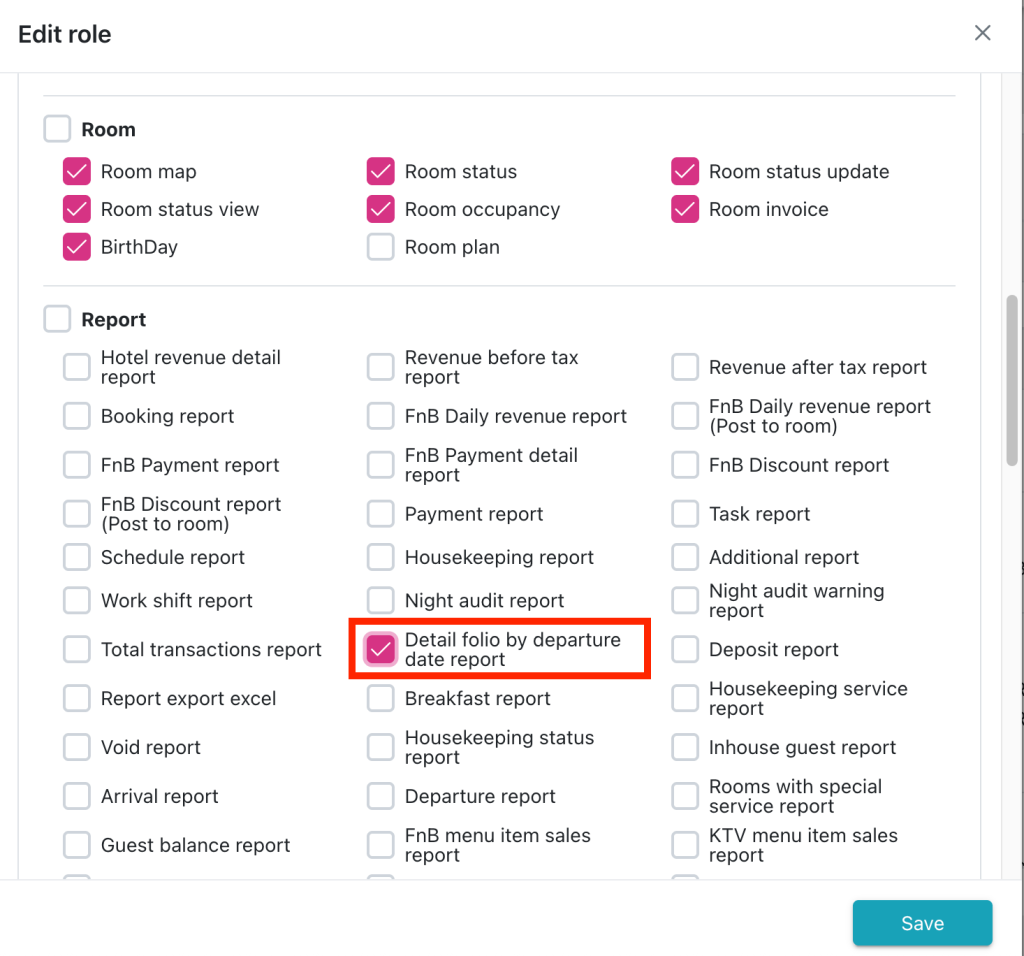
1. Add access permissions for the “Detail folio by departure date report” in the Config > Access control screen.
Navigation: Config > Access control > Add New/ Edit role
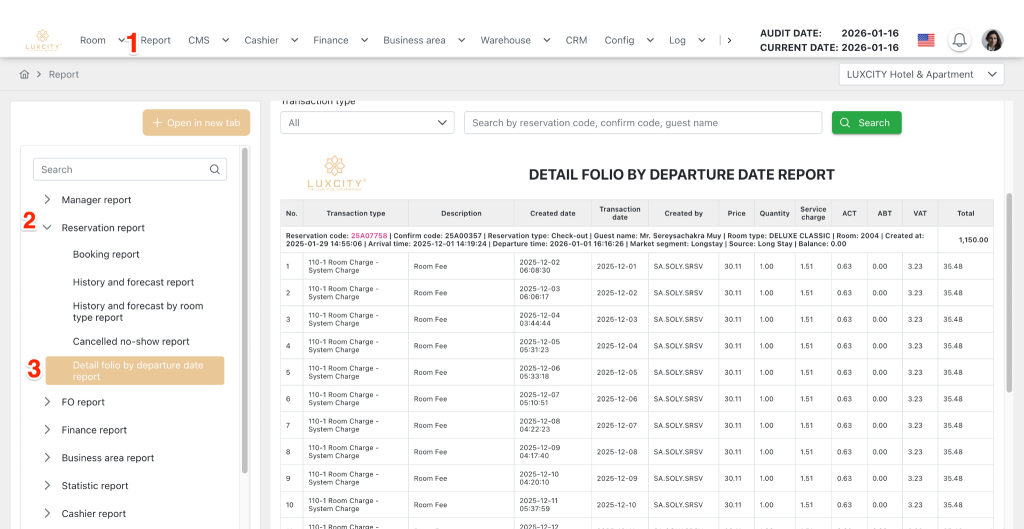
2. Add the “Detail Folio By Departure Date Report” into Report > Reservation Report Group
3. Describe definition of components on report screen
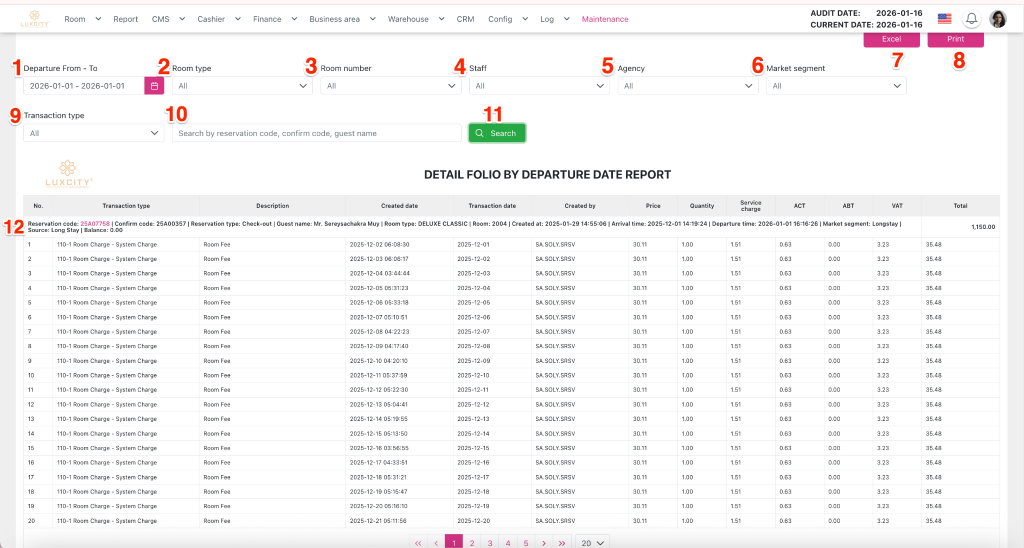
- Departure From – To (1): Range date picker.
- Select the start and end dates to filter by the departure date of the booking.
- By default, the date ranges from the 1st to the current day of the current month.
- The start date is always less than or equal to the end date.
- Room type (2): Droplist. Allows users to search for room type by name. Multiple choice. Click to display the list:
- Selecting “All”: selects all room types available in the hotel; this value is the default.
- The next options are a list of room types available in the hotel, sorted alphabetically.
- Room number (3): Droplist. Multiple choice. Allows users to search by room name. By default, it’s disabled; hint text: “All”. It’s enabled when the “Room type” field has a value other than “All”. Click to display the list:
- Selecting “All”: selects all room numbers available in the hotel; this value is the default.
- The next option is a list of the hotel’s room numbers, sorted alphabetically.
- Staff (4): Droplist. Allows users to search by staff name. Multiple choice. Click to display the list:
- Selecting “All”: selects all hotel staff; this value is the default.
- The next option is a list of the hotel’s staff, sorted alphabetically.
- Agency (5): Droplist. Allows users to search by agency name. Click to display the list:
- Selecting “All”: selects all hotel agencies; this value is the default.
- The following options are a list of the hotel’s agencies, sorted alphabetically.
- Market segment (6): Droplist. Allows users to search by market segment name. Multiple choice. Click to display the list:
- Selecting “All”: selects all market segments of the hotel; this value is the default.
- The following options are a list of hotel market segments, sorted alphabetically.
- Excel (7): Button. Click to export the grid results to an Excel file.
- Print (8): Button. Click to print the report to a hard copy.
- Transaction type (9): Droplist. Allows users to search by market segment name. Multiple choice. Click to display the list:
- Selecting “All”: selects all transaction types for the hotel; this value is the default.
- The next options are a list of the hotel’s transaction types, sorted alphabetically.
- Search by reservation code, confirm code, guest name (10): Textbox. Allows users to enter information to search for dummy room bookings by reservation code, confirmation code, or guest name.
- Fields on the grid :
- Display a list of folders categorized by booking corresponding to the selected departure date
- The system groups the folio list by booking with the following requirements:
- Reservation code: Display the booking code value of the detail folio by departure date.The code is displayed as a hyperlink; clicking on it opens a new tab with the booking details screen for the corresponding booking.
- Confirm code: Display the booking confirmation code value for the detail folio by departure date.
- Reservation type: Display the booking type of the detail folio by departure date.
- Guest name: Display the room type name in the detail folder by departure date.
- Room type: Display the room number of the detail folio by departure date.
- Room: Display the room number of the detail folio by departure date.
- Created at: Display the creation date of the detail folio by departure date. Format: YYYY-MM-DD hh:mm:ss
- Arrival time: Display the arrival date of the detail folio by departure date. Format: YYYY-MM-DD hh:mm:ss
- Departure time: Display the departure date of the detail folio by departure date. Format: YYYY-MM-DD hh:mm:ss
- Market segment: Display market segment information for detail folio by departure date
- Source: Display source information for detail folio by departure date
- Balance: Display the current balance of the booking.
- Total: Display the total payment amount for the booking. Formula is calculated Sum of the Total column values of all folios on the same booking
- Arranged in the following order:
- Priority 1: Room type names in alphabetical order
- Priority 2: Booking creation date (Booking date column)